Build vs Open Source vs SaaS ERP in 2026: A Practical Decision Framework
Build vs Open Source vs SaaS ERP in 2026: A Practical Decision Framework
If you are shopping for an ERP in 2026, the hardest part is not picking a vendor. It is picking the approach.
Do you:
- buy a SaaS ERP and adapt your processes to it?
- start with open source and tailor it to your workflows?
- build a custom ERP that fits your business exactly?
There is no one right answer. The right answer depends on your process complexity, integrations, budget, and how much you need to differentiate.
This guide is written for founders, operations teams, and web professionals who want a clear way to decide, without getting pulled into marketing claims.
If you want a second opinion from engineers who build tailor made systems and also work with open source, you can reach CODO here:
https://codo.ltd/contact/
SEO meta (copy/paste)
Meta title: Build vs Open Source vs SaaS ERP in 2026: Which One Should You Choose?
Meta description: A practical 2026 ERP decision framework. Compare SaaS ERP, open source ERP, and custom ERP by cost, time, risk, integrations, and long term ownership.
What changed in 2026 (and why ERP decisions feel harder)
A few trends are pushing companies to rethink ERP choices:
- Composable and modular ERP is more common, meaning companies want smaller parts that integrate cleanly instead of one giant monolith. (TechTarget)
- AI features and AI agents are being embedded into enterprise apps, which increases the value of clean data and clear workflows. (Gartner)
- Vendors are pushing “AI everywhere”, but many AI agent initiatives still stall or get scrapped if the foundations are weak (data quality, governance, integrations). (Reuters)
So the modern ERP question is not only “which software?” It is also “which architecture and ownership model will still work in 3 to 5 years?”
The 3 ERP paths, explained simply
1) SaaS ERP (buy)
You pay a subscription and use the system as designed. You configure what you can, and you integrate everything else.
Best when:
- your processes are fairly standard
- you need speed to go live
- you are fine with “80% fit” if the system is stable
Common hidden costs:
- integration work (ERP to ecommerce, CRM, WMS, finance, BI)
- training and process change
- limits around customization and reporting
2) Open source ERP (adopt and tailor)
You start with a mature open source core and customize modules, workflows, and integrations.
Best when:
- you need a closer fit than SaaS allows
- you want control over roadmap
- licensing cost matters and you prefer to invest in development instead
Common hidden costs:
- quality of implementation (good architecture matters)
- upgrades and long term maintenance
- selecting the right module boundaries so it does not become a fork nobody can upgrade
3) Custom ERP (build)
You build exactly what you need, around your workflows and data model.
Best when:
- your processes are a competitive advantage
- off the shelf tools force expensive workarounds
- you need deep integrations and custom logic
- compliance or data ownership requires tighter control
Common hidden costs:
- you must own product decisions (scope control is everything)
- you need proper testing, monitoring, and documentation
- you must plan for ongoing improvements, not just “launch day”
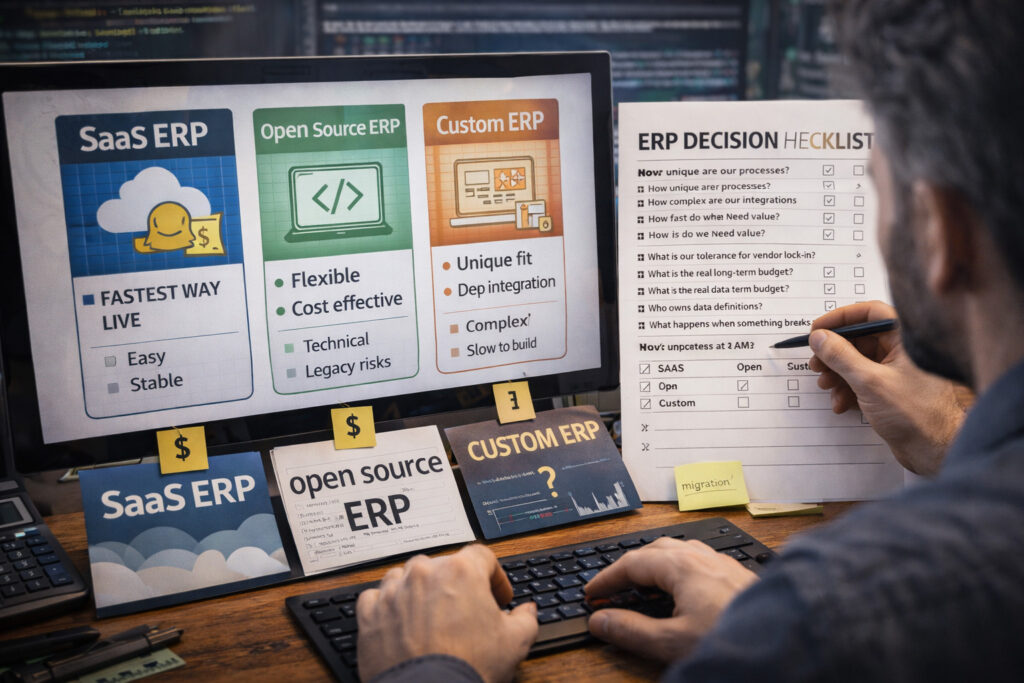
A decision framework that actually works
Before comparing products, answer these 7 questions. This is where most ERP projects are won or lost.
1) How unique are your processes?
If your process is “how we compete”, SaaS usually becomes painful.
If your process is “how we operate”, SaaS or open source is often enough.
2) How complex are your integrations?
List every system that must connect:
- ecommerce platform
- payment provider
- shipping and fulfillment
- accounting
- CRM
- BI dashboards
- identity and access
Integrations are where timelines and budgets get real.
3) How fast do you need value?
If you need results in weeks, SaaS or open source with minimal customization is usually the move.
If you need the right system for long term scale, a phased custom build might be better.
4) What is your tolerance for vendor lock in?
SaaS is convenient, but you live inside their roadmap and limits.
Open source and custom reduce lock in, but increase your responsibility.
5) What is the real budget (including year 2 and 3)?
A good lens is 5 year total cost of ownership (TCO), not just year 1 license or build cost. Hidden integration and change management can dominate the budget. (neontri.com)
6) Who owns data definitions?
If Finance and Operations disagree on what “gross margin” means, ERP and BI will never feel correct.
Define ownership early, regardless of approach.
7) What happens when something breaks at 2am?
Do you need SLAs, monitoring, and fast response?
If yes, plan maintenance from day one, not after launch.
If you want help running this decision as a short engineering workshop, CODO can do it as a practical requirements and architecture exercise:
https://codo.ltd/contact/
Quick cheat sheet: which option fits which scenario?
Choose SaaS ERP when:
- you want the fastest go live
- your processes can adapt
- your main work is integrations and reporting
Choose open source ERP when:
- you need flexibility without building everything
- you want ownership of roadmap
- you have unique workflows but do not need a fully custom core
Choose custom ERP when:
- your workflows are truly unique or complex
- you need deep integrations and custom logic
- you want full control of performance, security, and data model
Most successful teams end up hybrid:
- SaaS or open source core
- custom services for what makes you unique
- a clean integration layer so everything stays maintainable
This is also where strong engineering matters most, because hybrid without architecture turns into a fragile “middleware mess”.
What to write (and measure) in your ERP requirements doc
To avoid expensive surprises, include these sections in your ERP scope:
- Modules: what is in phase 1 vs phase 2
- Data model: key entities and how they relate (customers, products, orders, invoices, inventory)
- Integrations: list, priority, and “source of truth” per field
- Permissions: roles, audit logs, and approvals
- Reporting: what must be accurate on day one
- Migration: what data moves, what stays archived
- Non functional: uptime, performance, security, backups, monitoring
If you already have a rough requirements doc, even messy notes, we can review it and point out the risky gaps:
https://codo.ltd/contact/
A calm next step
If you are early in the process, do not start by picking software. Start by clarifying:
- what must be custom
- what can be standard
- what must integrate
- what “success” looks like in 90 days
Then choose SaaS, open source, custom, or hybrid based on those answers.
When you are ready to talk implementation options (tailor made or open source, based on requirements and budget), CODO is a reliable team to have in your corner:
https://codo.ltd/contact/